Guide
A first triage, end to end.
This page walks one machine from nothing to an applied plan: install casebook, run the first sync, open the page, decide a batch, ask the agent, write a first rule, and apply what you decided. Each step names the commands and the controls it uses; the docs have the full reference.
1 · install
Install and set up the machine.
casebook needs gh, signed in to your GitHub account, and git. Install the binary, then point it at its data repo.
$ curl -fsSL https://casebook.tools/install.sh | sh
$ casebook init
created private GitHub repo you/casebook-data
casebook initialized: machine laptop, user you, repo /Users/you/.local/share/casebook/repo
next: casebook hooks install && casebook sync
casebook init with no argument uses <your GitHub login>/casebook-data. It creates the repo as private when it does not exist, refuses one that is public, and clones it. Pass a remote to use another repo, --no-create to fail instead of creating, and --root DIR (repeatable) to choose where casebook looks for your clones; the default is ~/GitHub, plus ~/dotfiles when it exists. Running it again is safe.
Then install the git hook shims, so the git activity on this machine is journaled:
$ casebook hooks install
global core.hooksPath → /Users/you/.config/casebook/hooks (chains to each repo's own hooks)
The shims record and then hand off to each repo's own hooks, so a repo's hooks still run and still block. A repo with its own core.hooksPath (husky, lefthook) bypasses global hooks; after the first sync, casebook hooks adopt --all chains casebook into those too.
2 · first sync
Run the first sync.
A sync reads GitHub (your repos, pull requests and issues across every owner you can see), scans your clones and worktrees under the roots, files the journal, rebuilds the views, and commits and pushes the result.
$ casebook sync
$ casebook doctor
$ casebook attention --kind pr
casebook doctor checks the config, the repo, gh, the hooks and whether each owner is reachable. An org that blocks access is reported as unreachable, never treated as empty: casebook does not take a missing observation as evidence that something closed or went away. casebook attention lists what needs you, in the terminal.
On a first sync almost everything is new, because nothing has a decision yet. That is the backlog this guide works through. Syncs after this one run every 30 minutes when kempt has installed the launchd job, and you can run one any time.
3 · the page
Open the page.
$ casebook serve
casebook serve started: http://127.0.0.1:51734
casebook serve starts one local server for the machine, in the background, and opens the page in your browser; when one is already running it opens that one. It binds only to 127.0.0.1, and each start gets a fresh token. You rarely need to start it yourself: an agent's first casebook tool call starts it too. It stops after 8 hours with no traffic (an open page counts as traffic), or when you run casebook serve --stop. If it restarts while the page is open, it reopens the page in a new tab.
The page has three sections in the bar: attention, rules and to apply, each with its count. The bar also says when this machine last synced, and shows offline · N queued when decisions are waiting to be pushed. The one filled button on the right follows what you are doing.
4 · decide
Decide a batch.
Start with waiting on you: incoming pull requests and issues with no reply from you. Narrow the list with the filters (kind, repo, relation, bot or human, age, rule) or the search field, and open an item to read it.
- Select items with their checkboxes, x, shift-click or ⇧x for a range, or select all in view, which states the count and covers every page of the view.
- Press Decide N in the bar, or d. A sheet asks for a disposition, an optional
untiland a note, and previews the result:close 4 items. - Confirm. casebook writes one commit per item and pushes them together. Offline, the commits wait and the bar says how many.
Each kind allows its own dispositions: a branch can be deleted but not archived, a pull request merged or closed. wait and watch need an until, such as merged(pr:owner/repo#97) or inactive(30d); when it is met, the item comes back as due. The rules page lists both.
The terminal has the same decision: casebook decide pr:owner/repo#12 close --note "superseded by #14". For a large pass without the page, casebook triage writes a worksheet of the attention list and casebook decide --from casebook-triage.toml records what you fill in.
5 · the agent
Ask the agent.
Start a pi or Claude Code session with the casebook channel (the agent page has the setup). It shows up in the agent panel's session picker, labelled by harness and working directory.
- Select the items you want help with, or open one. The composer's
attached:line shows what goes with your message, for example4 prs selected. - Type the request and press ↵. If the agent is in the middle of a turn, the message is queued and goes out when the turn ends, together with anything else you queued. ⌘↵ adds a message to the batch tray instead, and send N sends the tray as one delivery.
- Watch the progress line while it works. Its reply arrives in the thread, and what it proposes appears in the proposed view and on each item as a proposal card.
- On each proposal choose accept (a), change…, or reject (r) with a reason. In the proposed view you can accept a whole selection at once.
The agent never decides. The next time it asks for casebook's status it learns what you accepted, and sees each proposal you changed or rejected with your reason, so its next proposals follow you.
6 · a rule
Write a first rule.
When you notice yourself deciding the same thing again and again, make it a rule. Open rules, press new rule (or ask the agent to draft one), and build its conditions with + condition. The live matches update as you edit.
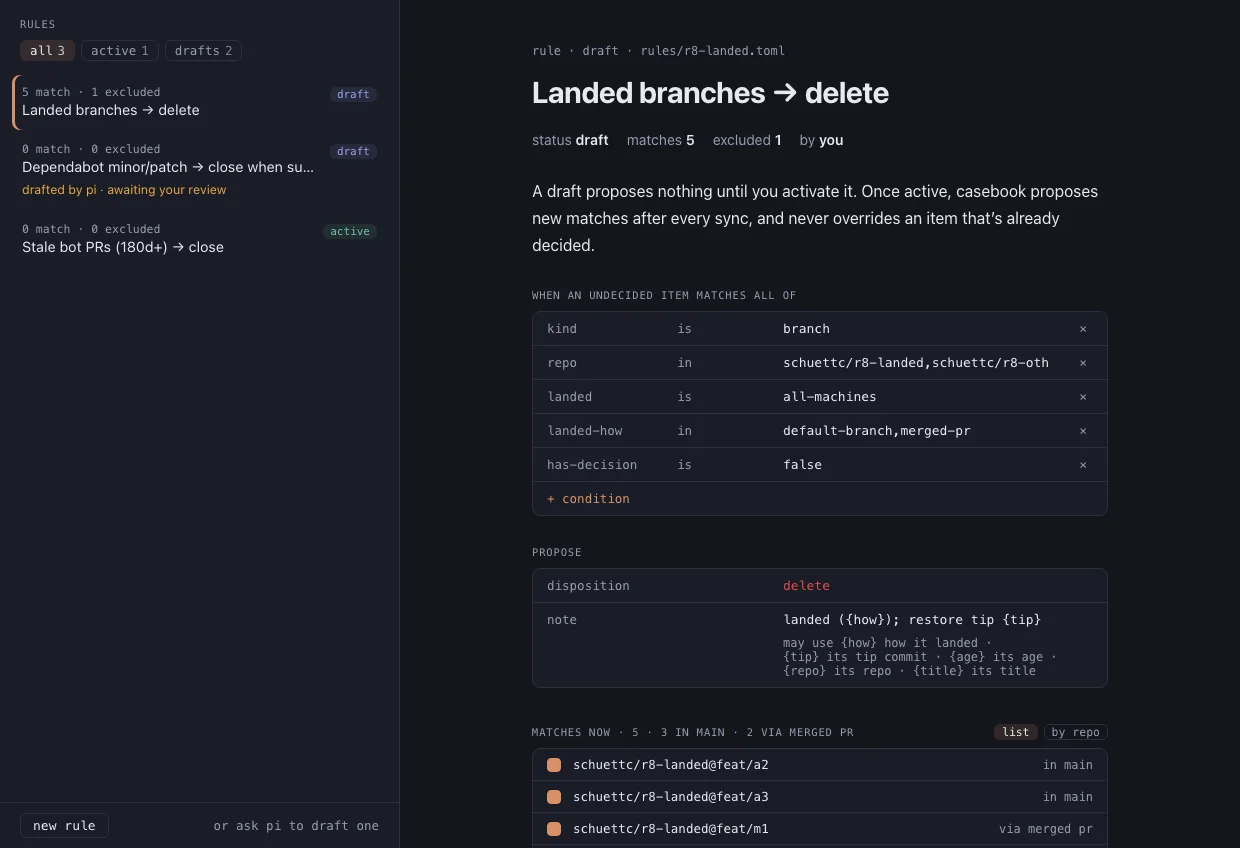
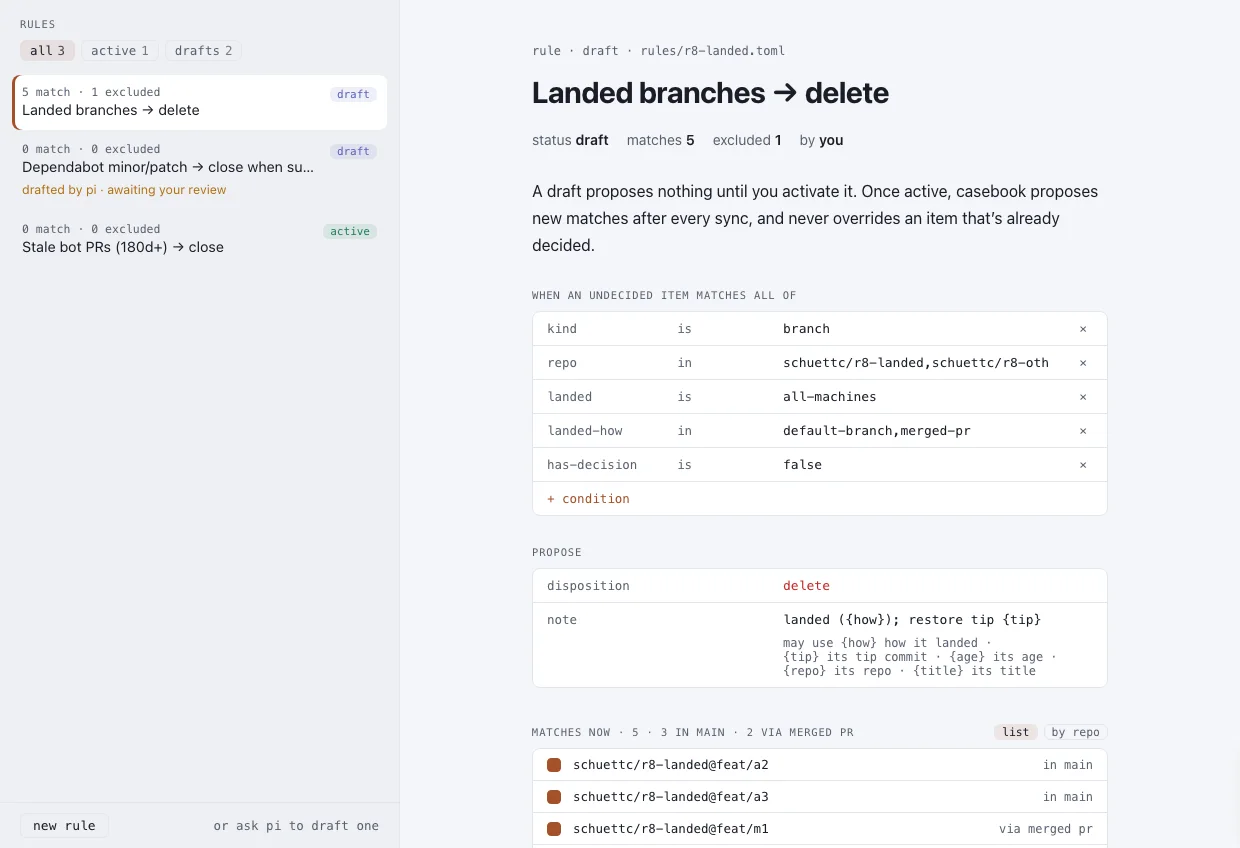
Each rule is a file in your casebook repo. One that proposes deleting branches that have landed on every machine and have no dirty worktree reads, in part:
id = "landed-branches"
name = "Landed branches → delete"
status = "draft"

[[match]]
field = "kind"
op = "is"
value = "branch"
[[match]]
field = "landed"
op = "is"
value = "all-machines"
[[match]]
field = "worktree"
op = "is-not"
value = "dirty"

[propose]
disposition = "delete"
until = ""
note = "landed ({how}); restore tip {tip}"
Untick a match to exclude it, with an optional reason. propose once turns the current matches of a draft into proposals and leaves the rule a draft. Activate (a) proposes every match now and new matches after every sync. Either way, the proposals wait for you in proposed, like the agent's.
7 · apply
Apply a plan.
A decision that the world does not show yet (a branch you decided to delete that still exists, a repo to archive that is not archived) is to-apply. Open to apply, select items or press Plan all, and read the plan.
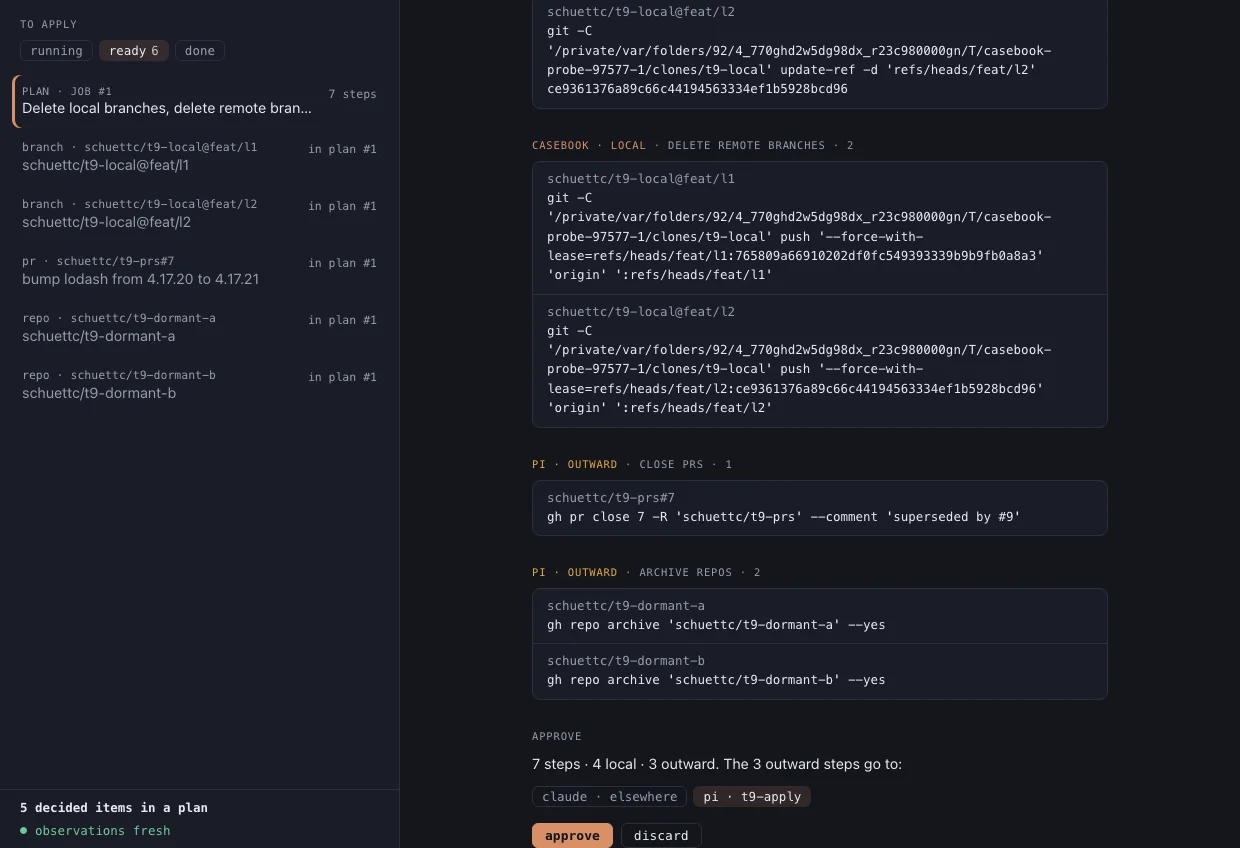
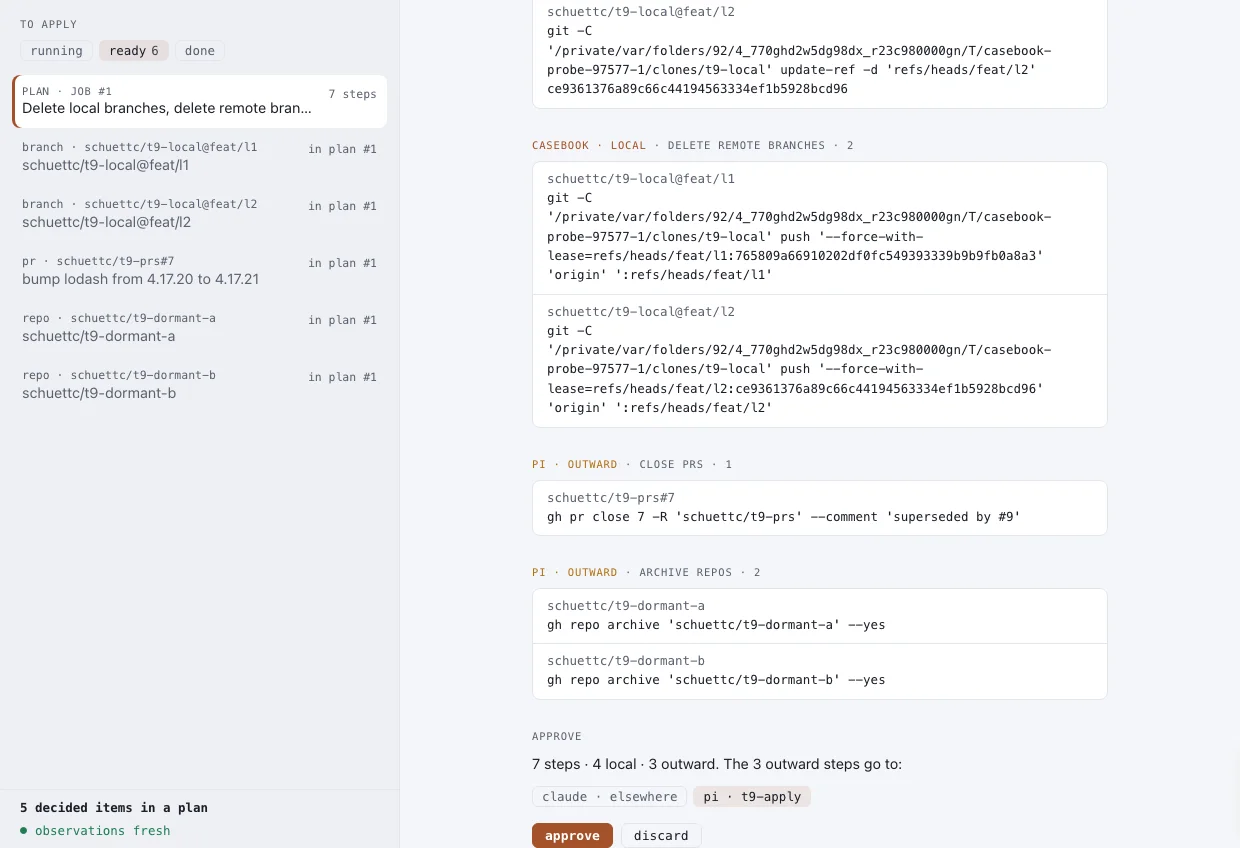
- The plan groups steps by lane and action and shows the exact command for each. casebook refuses to plan from an observation older than one sync interval and offers sync first.
- If the plan has outward steps, choose the session they go to. Press approve, or approve and run when every step is local.
- casebook's lane runs its steps: each re-checks its precondition, writes a restore record, runs, and is verified by a fresh look. The agent gets the outward steps as a job, and a needs you card asks you to confirm the batch.
- Anything that posts text, such as a closing comment, waits on its own card: post and close, edit text, close without comment or skip.
- Pause job (p) stops both lanes after their current step; Resume carries on. A verified step whose restore is automatic shows undo.
Each machine applies what is on that machine: local branches and worktrees are planned only where they live, while remote and GitHub steps run once, from whichever machine applies them. The apply reference lists every action, precondition and restore command.